Specifications, Data and Logs#
NGPS Instrument Specifications#
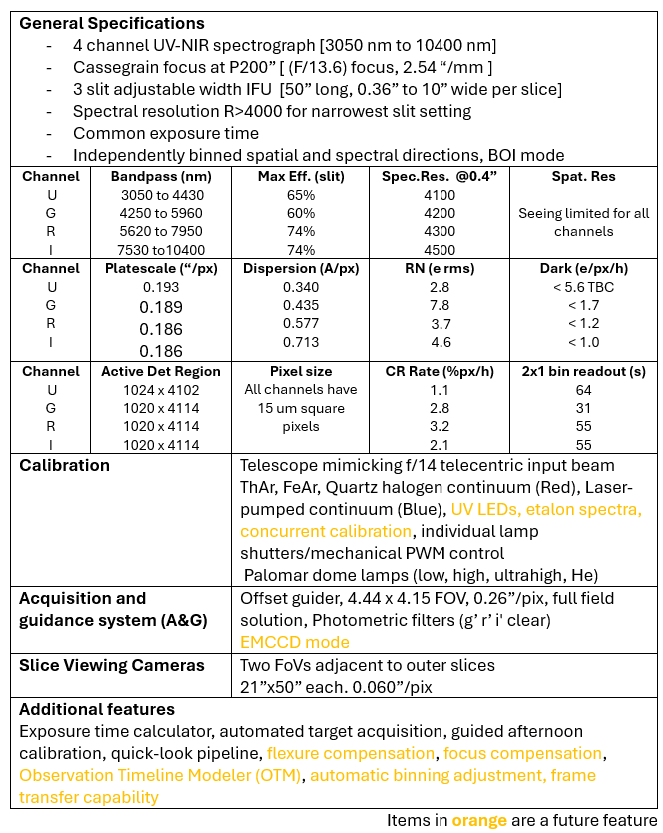
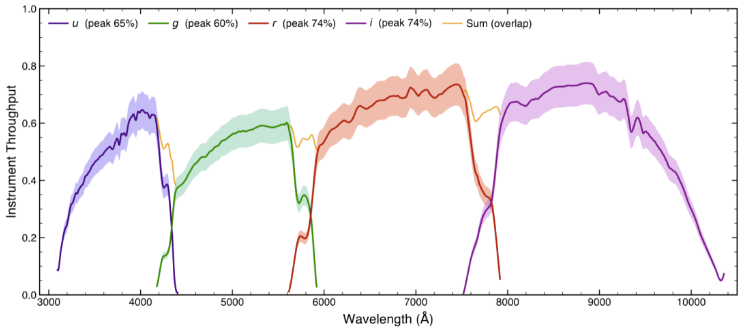
Mechanical & Thermal
Instrument Dimensions: 120 x 62 x 58”
Instrument Mass: ~ 2900 lbs.
Instrument Cart Dimensions: 72 x 54 x 63”
Instrument Cart Mass: ~1600 lbs.
Operating Temperature: -10C to 30C
Power & Utilities
Voltage: 110VAC 60Hz (Two standard 15A AC power cords)
Power Consumption: ~ 1.4kW
Cooling Requirements
Closed cycle chiller
Dry air compressor for de-fogging
Data Files#
All data is stored at /data/YYYYMMDD/ where YYYYMMDD is the UTC date for the evening of observation. The dated directory is automatically created at local noon. Data files cannot be changed or removed by the observer. Therefore, any daytime calibrations performed after local noon will be associated with that evening’s UTC date even though the time has not yet crossed over to the new date.
Manual ACAM and SliceCam frame grabs are saved in a directory on the observer’s desktop, /home/observer/Desktop/Framegrabs/. Images older than 30 days are automatically removed from that directory. Automatically-saved ACAM and SliceCam images are saved with the science data under /data/YYYYMMDD/acam/ and slicecam/ and cannot be removed.
A typical 1x2 binned 4 channel instrument data file is ~ 24Mb.
Science#
Science images are stored in uncompressed, multi-extension FITS file format. There is one extension for each channel. Any given channel is not guaranteed to have a consistent absolute extension number (1, 2, 3, 4). Instead, use EXTNAME keyword to identify a particular channel’s extension. If any channel is missing, there will be no extension for that missing channel. The primary HDU [0] holds header information only, common to all channels.
The file naming convention is ngps_YYMMDD_nnnn.fits where YYMMDD is the UTC date and nnnn is a unique sequential number.
ACAM#
When the “save series” button is used in the GUIDER GUI, images are saved in /data/YYYYMMDD/acam/acam_xxxxx.fits where xxxxx is a unique sequential number.
Log Files#
Observing Log#
A log file is recorded which serves as an “observer’s notebook” log. This log records key parameters, observations, events and user comments (entered via the GUI). This is stored at <future_feature>.
Daemon Logs#
All ICS daemons record detailed logs of their activities. The detail is generally greater than that needed by an observer but is used primarily for debugging (or the extremely initiated). Log files are stored with the data at /data/YYYYMMDD/logs/xxxxxxx_YYYYMMDD.log where xxxxxxx is the daemon name and YYYYMMDD is the UTC date. All time-stamped log entries use UTC.