Detector and Command Reference#
CCDs#
This appendix describes the available CCD amplifiers, their naming conventions, and other related details.
G,R,I Channels#
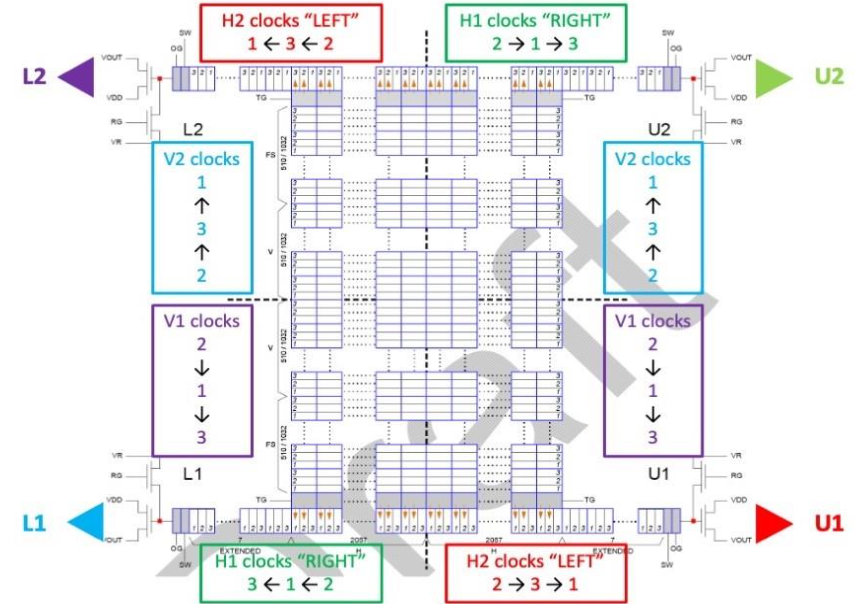
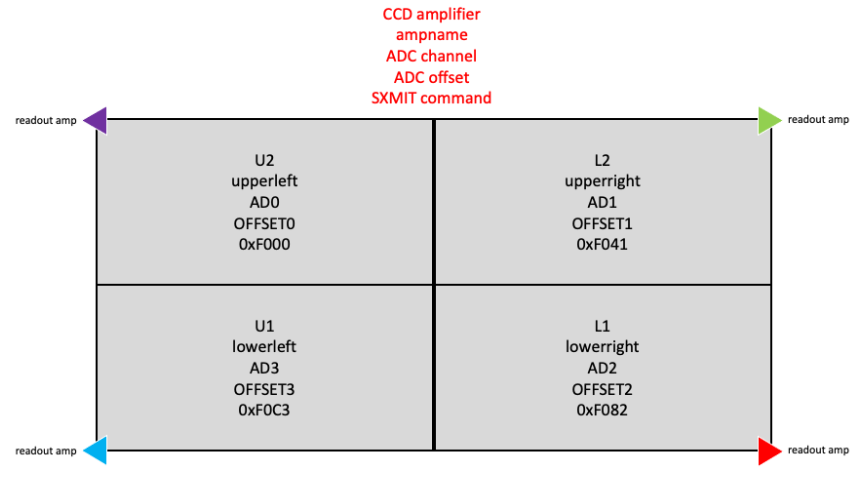
U Channel#
CLI Commands#
This section contains the recognized command line interface (CLI) commands.
[Not yet implemented. Incomplete list.]
Command |
Description |
|---|---|
|
Move to specified coordinates. Omit coordinates to move to the currently loaded database target. If coordinates are specified, then both are required. |
|
Triggers exposure and waits for completion |
|
Triggers exposure and returns (no wait) |
|
Repeat the last exposure |
|
Stops the exposure delay in progress (not the readout) |
|
Sends abort signal to all processes |
|
Starts the sequencer list processing |
|
Configures the calibrator for the specified target where |
|
Initialize connection to science cameras. Default is all cameras. Optionally specify one or more channels with comma-separated list, where |
|
Shut down camera system |
|
Configure science camera settings |
|
Set slit width and offset. Offset is optional |
|
|
|
|
|
|
|
|
|
Options include: |